
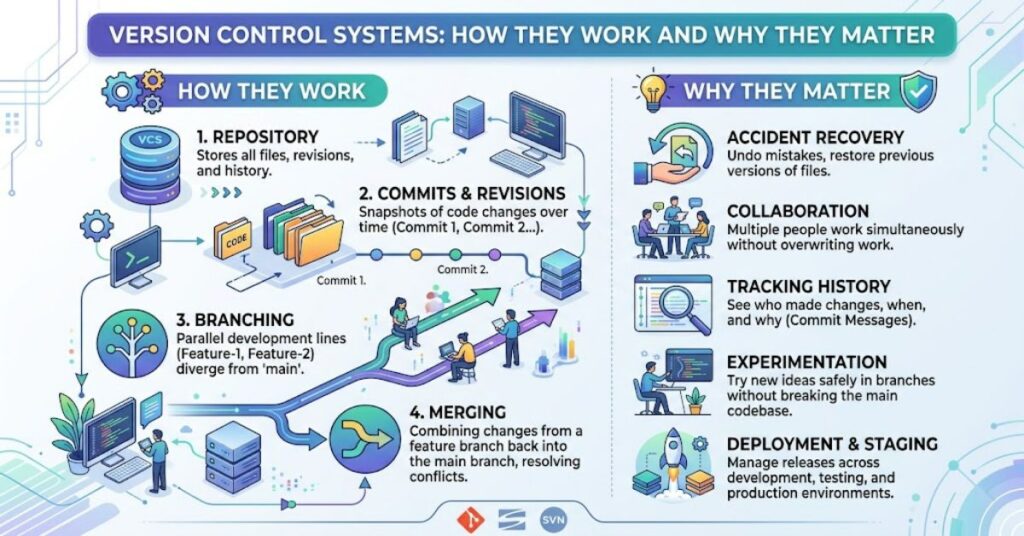
Version control systems are software tools that track and manage changes to files over time. They are widely associated with software engineering, where source code can change rapidly and multiple developers may work on the same project. However, a VCS can also manage documentation, configuration files and other digital assets.
The central idea is simple: instead of relying on manually saved copies such as project-final, project-final2 and project-final-real, a version control system maintains structured history. That history can show what changed, who made the change, when it happened and, depending on the workflow, why it was made.
GitHub describes version control as a way to track the history of changes as people and teams collaborate. Earlier versions can be recovered, while project history provides context about decisions and development.
For software teams, this turns an otherwise difficult problem — coordinating constantly changing files — into a manageable technical process.
How Does Version Control Work?
A typical repository contains the project’s files together with information about their history. Developers modify files, review those modifications and record groups of changes as commits.
A commit acts as a defined point in the project’s history. Instead of asking which copy of a file is the latest, developers can inspect the repository’s recorded sequence of changes.
| Version control concept | What it does | Practical value |
| Repository | Stores project files and history | Creates a shared source of truth |
| Commit | Records a set of changes | Creates a recoverable historical point |
| Branch | Separates a line of development | Allows work to happen independently |
| Merge | Combines development histories | Integrates completed work |
| Diff | Shows differences between versions | Makes changes easier to review |
| Revert | Reverses a recorded change | Helps recover from mistakes |
The UK’s GOV.UK Service Manual recommends maintaining version control for code, using clear commit messages, grouping changes according to purpose and reviewing changes.
That guidance reveals an important point: version control is partly a technical system and partly a working discipline. A repository filled with unclear commits and poorly managed branches can still become difficult to understand.
Centralised vs Distributed Version Control
There are two broad models: centralised version control and distributed version control.
In a centralised system, a central server contains the main repository. Developers obtain files from that server and commit changes back to it. Subversion and Perforce are examples of centralised approaches.
Distributed version control systems work differently. Each developer can have a complete local copy of the repository and its history. Git and Mercurial are examples.
| Feature | Centralised VCS | Distributed VCS |
| Main architecture | Central repository | Full repositories distributed to contributors |
| Local history | More limited | Full project history available locally |
| Offline work | More restricted | Many operations can happen offline |
| Examples | SVN, Perforce | Git, Mercurial |
| Branching | Supported | Strongly supported by modern tools |
| Central server | Fundamental to model | Optional but commonly used |
The distinction is important because “distributed” does not mean a project cannot have a central repository. Git teams commonly maintain an authoritative remote repository while still benefiting from complete local histories.
Why Branches Matter
Branches are one of the most useful features in modern version control.
A branch provides an isolated line of development. A developer can create one to build a feature, repair a bug or test an idea without immediately changing the main development line.
GitHub describes branches as a way to isolate development work and safely develop features, fix bugs or experiment with ideas.
This creates a practical workflow:
- Create a branch from the main development line.
- Make changes in isolation.
- Commit those changes.
- Test and review the work.
- Merge the branch when it is ready.
The advantage is not merely technical isolation. It creates a decision point. Work can be inspected before becoming part of the main codebase.
Version Control and Code Review
Version control also provides the foundation for collaborative review.

A developer can submit changes for inspection, allowing colleagues to examine the diff rather than reviewing an entire project from scratch. In Git-based workflows, pull requests commonly connect branches with discussion, review and eventual integration.
GOV.UK’s development guidance recommends that code changes should be reviewed by someone other than the person who wrote them whenever possible.
This produces one of the less obvious benefits of version control: it creates an audit trail for technical decisions. The repository does not simply preserve code. It can preserve the reasoning and discussion surrounding important changes when commit messages, issues and reviews are properly connected.
Version Control in DevOps
Version control has become closely connected with continuous integration and continuous delivery.
When developers push changes to a repository, automated systems can run tests, security checks and builds. Successful changes can then move through staging and deployment workflows.
The Cabinet Office Digital Handbook recommends continuous integration and continuous deployment where appropriate, alongside code review and automated processes that reduce manual error and improve software quality and assurance.
| Development activity | Role of version control |
| Coding | Records incremental changes |
| Testing | Identifies the exact code version being tested |
| Review | Provides diffs and change context |
| CI | Triggers automated checks from repository events |
| Deployment | Identifies the code version being released |
| Incident response | Helps identify and compare previous states |
This means version control is no longer simply a developer’s backup mechanism. It can form part of the operational chain connecting an idea to production software.
Risks and Limitations
Version control does not automatically make development safe.
Poor commit messages reduce the usefulness of project history. Excessive branching can create integration complexity. Unreviewed changes can still introduce defects. Access controls must also be managed carefully, particularly when repositories contain sensitive source code.
Large binary files present another challenge. Distributed systems may require repository histories to be copied between environments, which can become inefficient when projects contain substantial quantities of large files.
There is also a security consideration. A repository can preserve secrets accidentally committed into source code. Removing a password from the latest version does not necessarily remove it from historical commits. This makes secret management separate from ordinary version control.
The practical lesson is that a VCS records history; it does not decide whether the history is well managed.
Real-World Use: GOV.UK
A useful documented example comes from the UK Government Digital Service. GOV.UK states that it uses GitHub for version control, code deployments, authentication, continuous integration, Dependabot and GitHub Pages. Its guidance was updated on 21 August 2026.
This demonstrates how version control can sit at the centre of a wider engineering system rather than functioning as an isolated developer tool.
The Cabinet Office also advises teams to use version control and, where appropriate, make source code open and reusable, while recognising that sensitive material such as credentials and certain security-related code may need to remain closed.
The Future of Version Control Systems in 2027
The underlying purpose of version control is unlikely to change in 2027: teams will still need reliable histories of changing digital assets.
What is changing is the scale of collaboration around repositories. Modern development increasingly connects version control with automated testing, dependency management, security scanning, code review and deployment.
Git remains central to this model. GitHub’s documentation describes repositories as self-contained collections of files and revision history, while branches provide separate lines of development for collaborative work.
The more interesting development is therefore not a replacement for version control, but deeper integration. As automated development tools become more capable, repository history becomes increasingly important for establishing which changes were made, which were reviewed and which version ultimately reached production.
Key Insights
- Version control is both a technical system and a collaboration discipline.
- Distributed repositories reduce dependence on constant network access for many development operations.
- Branches create controlled spaces for experimentation and feature development.
- Clear commit messages increase the long-term value of project history.
- Code review turns repository history into part of a quality-control process.
- Version control can connect development directly to automated testing and deployment.
- Repository history requires its own security practices, particularly around secrets and sensitive information.
Conclusion
Version control systems solve a fundamental problem in software development: how to manage changing files without losing history or creating confusion between contributors.
The technology has developed from centralised source-control models towards distributed systems such as Git, where every developer can maintain a complete repository history. This model supports offline work, branching, merging and flexible collaboration while still allowing teams to maintain a central authoritative repository.
The value extends beyond recovering an earlier version of a file. A well-managed repository can explain how software evolved, support code review, provide evidence for deployment decisions and connect development work with automated testing.
The strongest results come when version control is treated as part of the development process rather than simply as a storage system. Clear commits, sensible branching, peer review, appropriate access controls and automated checks all determine how useful the underlying technology becomes.
FAQ
What are version control systems used for?
Version control systems track changes to files and preserve their history. They allow teams to collaborate, compare versions, recover earlier states, create branches and understand how a project has developed.
What is the most common version control system?
Git is the most widely used modern distributed version control system and is extensively used in both open-source and commercial software development.
What is the difference between Git and version control?
Version control is the general concept and category of tools used to manage file history. Git is a specific distributed version control system.
What is a repository in version control?
A repository is a project’s files together with the information needed to maintain their revision history. In Git, a repository contains commits, branches and other metadata associated with the project’s development.
Why are commits important?
Commits create identifiable points in project history. Clear commit messages can explain what changed and why, making future maintenance and troubleshooting easier.
Are version control systems only for software developers?
No. Although they are strongly associated with source code, version control can also track documentation, configuration files and other digital assets that require a history of changes.
Methodology
This article was researched using current documentation from GitHub, GOV.UK, the Cabinet Office Digital Handbook and established technical documentation from Atlassian. These sources were used to validate definitions, workflows, centralised and distributed architectures, branching, code review and the role of version control in UK public-sector development.
No firsthand software testing or repository benchmarking is claimed. The GOV.UK example is a documented organisational case rather than an independently observed test. The article also avoids treating one workflow as universally appropriate because repository size, team structure, security requirements and deployment practices differ.
Editorial disclosure: This article was drafted with AI assistance and should be reviewed and independently verified by the editorial team before publication.
References
Atlassian. (2026). Types of version control. Atlassian Support.
Atlassian. (2026). What is Git? Atlassian Git Tutorial.
Atlassian. (2026). Why use Git for your organisation? Atlassian Git Tutorial.
Cabinet Office. (2026). How to store source code. GOV.UK Digital Handbook.
Cabinet Office. (2026). Software development and operation policies. Digital Handbook.
GitHub. (2026). About Git. GitHub Docs.
GitHub. (2026). Branches. GitHub Docs.
Government Digital Service. (2026). How GOV.UK uses GitHub. GOV.UK Developer Documentation.