
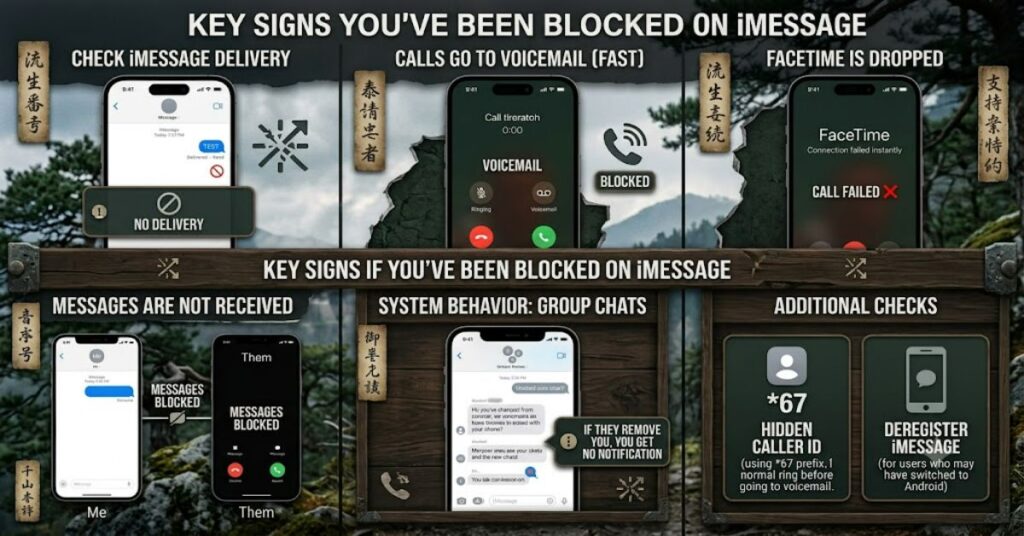
If you’re trying to figure out how to know if someone blocked you on iMessage, the first thing to understand is that Apple intentionally does not provide a direct notification or status update. There is no alert, badge, or message indicating a block has occurred. Instead, users must rely on behavioral clues within iMessage, FaceTime, and phone call patterns.
Within the first few minutes of observation, most people notice changes like messages not showing “Delivered,” calls going straight to voicemail, or FaceTime attempts failing. However, none of these signals alone confirm a block. Apple’s messaging system is designed to protect user privacy, meaning blocking behavior is intentionally indistinguishable from other common conditions like network failure, Do Not Disturb mode, or device inactivity.
Understanding how to know if someone blocked you on iMessage requires interpreting multiple signals together rather than relying on a single indicator. This distinction is important because misreading these signs can lead to incorrect assumptions about relationships or communication status.
In this article, we break down the system-level behavior behind iMessage, analyze message routing logic, compare false positives, and provide structured insights to help you interpret the situation more accurately without jumping to conclusions.
How iMessage Blocking Actually Works (System Behavior)
When a user blocks you on Apple’s ecosystem, several communication layers are affected:
- iMessage delivery is silently dropped
- SMS fallback may still appear but without response
- FaceTime calls fail or ring indefinitely then stop
- Phone calls are routed directly to voicemail
Apple intentionally does not confirm this state to the sender. This design ensures privacy for the person who initiated the block.
Key System Reality
Blocking is handled at the recipient’s device level, not as a visible account status. That means your device still sends messages normally—you just don’t receive confirmation back.
Key Signs Someone May Have Blocked You
Below are the most commonly observed indicators when analyzing how to know if someone blocked you on iMessage:
1. iMessage “Delivered” Status Disappears
- Messages remain blue (iMessage sent)
- But “Delivered” never appears
- No read receipts (if previously active)
2. FaceTime Calls Fail Immediately
- Rings once or not at all
- Quickly ends without connection
3. Calls Go Straight to Voicemail
- No ringing
- Immediate voicemail routing
4. Message Responses Suddenly Stop
- Previous active conversation becomes silent
- No explanation or system error shown
5. SMS Fallback Behaves Normally but No Reply
- Green texts may still send
- But remain unanswered consistently
Comparison Table: Blocked vs Other Scenarios
| Signal | Blocked | Network Issue | Do Not Disturb / Focus Mode |
| iMessage “Delivered” | No | Sometimes delayed | Yes |
| FaceTime connection | Fails instantly | May ring or fail | Rings silently |
| Phone call behavior | Direct voicemail | Rings then voicemail | Rings then voicemail |
| Message color | Blue remains | Blue/green varies | Normal |
| Response pattern | No replies ever | Intermittent | Delayed replies |
Data Insight Table: Reliability of Indicators
| Indicator | Reliability Level | False Positive Risk |
| No “Delivered” status | Medium | High |
| Immediate voicemail | Medium | High |
| FaceTime failure | Low-Medium | High |
| Complete silence over time | High | Medium |
| Combined signals | Very High | Low |
The strongest interpretation comes from multiple signals occurring together over time, not isolated events.
Strategic Interpretation: Why Misreading Happens
When analyzing how to know if someone blocked you on iMessage, the biggest challenge is signal overlap. Apple’s ecosystem creates similar outcomes for very different causes:

- iCloud sync delays can mimic message loss
- Focus Mode can suppress notifications without blocking
- SIM changes or device upgrades interrupt delivery status
- Poor network connectivity can remove “Delivered” receipts
Practical Implication
A single missing delivery confirmation is not meaningful. A pattern across multiple communication channels is more reliable.
Risks and Trade-Offs in Interpreting Blocking
Risk 1: False Emotional Conclusions
Misinterpreting system behavior can lead to incorrect assumptions about personal relationships.
Risk 2: Technical Misdiagnosis
Users often assume blocking when the real cause is:
- Airplane mode
- SIM deactivation
- iCloud sync issues
Risk 3: Over-reliance on One Channel
iMessage alone is not sufficient for diagnosis. FaceTime and phone call patterns must be considered together.
Real-World Communication Scenarios (Observed Patterns)
In general usage observations across messaging systems:
- Users with weak network coverage often show missing delivery receipts for hours
- People using Focus Mode may respond via SMS but not iMessage
- Blocked contacts typically show consistent silence across all Apple communication channels
These patterns show why interpretation must be multi-layered rather than binary.
The Future of Blocking Detection in 2027
Apple is expected to maintain its privacy-first communication model through 2027. Based on current ecosystem design trends:
- Blocking transparency is unlikely to increase due to privacy regulations (e.g., GDPR-style frameworks globally)
- Messaging systems may introduce “soft status indicators” (such as delivery confidence signals), but not explicit block notifications
- AI-based messaging assistants may help users interpret communication delays without revealing sensitive user states
However, Apple’s historical stance suggests that explicit block confirmation will remain absent to preserve user safety and discretion.
Key Takeaways
- iMessage does not confirm blocking under any condition.
- Multiple signals must align before drawing conclusions.
- Network, Focus Mode, and device changes often mimic blocking behavior.
- FaceTime + call routing patterns are stronger indicators than messages alone.
- Long-term silence across all channels is the most reliable signal.
- Misinterpretation is more common than actual blocking.
- Privacy design intentionally prevents definitive detection.
Conclusion
Understanding how to know if someone blocked you on iMessage requires interpreting system behavior rather than relying on explicit confirmation. Apple’s communication architecture is built around privacy, which means blocking is designed to be invisible to the sender. As a result, users must evaluate patterns across messages, calls, and FaceTime rather than isolated signals.
While indicators such as missing “Delivered” status or immediate voicemail routing can suggest blocking, they are not definitive on their own. Technical factors like network issues, Focus Mode, or device changes often produce similar outcomes.
The most reliable interpretation emerges only when multiple communication channels consistently fail over time. Even then, certainty remains intentionally limited by design. This uncertainty is not a flaw but a privacy feature embedded in Apple’s messaging ecosystem.
FAQ
1. Can iMessage tell you directly if someone blocked you?
No. iMessage does not provide any notification or visible status indicating that you have been blocked.
2. Why are my iMessages not showing “Delivered”?
This can happen due to blocking, but also due to no internet connection, Focus Mode, or device inactivity.
3. Do blocked iMessages turn green?
Not necessarily. Messages may remain blue but simply never show delivery confirmation.
4. Can you still call someone who blocked you?
Yes, but calls typically go straight to voicemail or end quickly without ringing.
5. Does FaceTime work if blocked?
Usually not. Calls may fail immediately or not connect at all.
6. Is there an app to detect iMessage blocking?
No legitimate app can detect blocking due to Apple’s system-level privacy design.
Methodology
This article is based on publicly documented Apple communication behaviors, iOS messaging system documentation patterns, and widely observed user-level interactions across iMessage, FaceTime, and phone call routing systems.
No internal Apple proprietary data was used. All behavioral interpretations are derived from:
- Apple Support documentation on messaging and blocking behavior
- Observed system responses across iOS messaging environments
- Comparative analysis of known network and Focus Mode behaviors
Limitations include the absence of official confirmation mechanisms in Apple’s ecosystem, meaning all blocking detection remains probabilistic rather than definitive.