
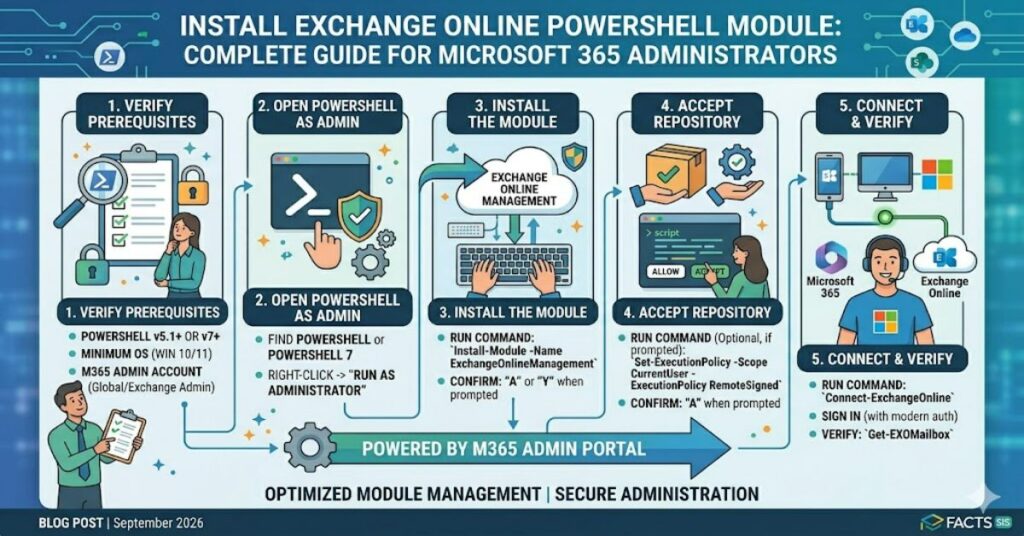
If you need to manage Microsoft 365 mailboxes, permissions, transport rules, or compliance settings, knowing how to install exchange online powershell module correctly is essential. Microsoft recommends using the ExchangeOnlineManagement module, which supports modern authentication and provides secure access to Exchange Online administration.
The installation process is straightforward. Open PowerShell with administrative privileges and run:
Install-Module -Name ExchangeOnlineManagement
Once installed, administrators can connect to Exchange Online and perform advanced management tasks that are difficult or impossible through the graphical interface alone.
As Microsoft continues to expand cloud-based administration capabilities, PowerShell remains a core tool for enterprise messaging environments. Whether managing a small organisation or a large Microsoft 365 deployment, understanding the Exchange Online PowerShell module is an important skill for IT professionals.
This guide explains installation requirements, configuration options, troubleshooting steps, security implications, and future developments affecting Exchange Online administration.
Understanding the Exchange Online PowerShell Module
The Exchange Online PowerShell module is Microsoft’s modern management framework for cloud-based Exchange administration.
Historically, administrators connected using remote PowerShell sessions. Microsoft has gradually shifted toward a REST API-backed architecture that improves reliability, performance, and security.
The ExchangeOnlineManagement module enables administrators to:
- Manage user mailboxes
- Configure shared mailboxes
- Create transport rules
- Manage distribution groups
- Audit permissions
- Configure compliance policies
- Retrieve reporting data
- Automate repetitive administrative tasks
Why Microsoft Replaced Legacy Connections
Older remote PowerShell connections relied heavily on WinRM-based sessions.
The newer module offers:
| Feature | Legacy Remote PowerShell | ExchangeOnlineManagement |
| Authentication | Basic authentication | Modern authentication |
| MFA Support | Limited | Native support |
| Performance | Slower | Faster |
| Security | Lower | Higher |
| Microsoft Support | Retired approach | Recommended |
| REST Integration | No | Yes |
For most organisations, migration to the modern module is no longer optional. It is the supported administrative method moving forward.
Prerequisites Before Installation
Before attempting to install exchange online powershell module, verify the following requirements.
PowerShell Version
Supported environments typically include:
| Component | Recommended Version |
| Windows PowerShell | 5.1 |
| PowerShell | 7.x |
| Microsoft 365 Account | Active |
| Internet Access | Required |
| PowerShell Gallery Access | Required |
Administrative Permissions
You may require:
- Local administrator privileges
- Microsoft 365 administrative roles
- PowerShell Gallery access
- Corporate firewall exceptions
In enterprise environments, package repositories are sometimes restricted through security controls. This is a common deployment obstacle.
How to Install the Module
Step 1: Open PowerShell as Administrator
Search for PowerShell and select:
Run as Administrator
Step 2: Configure TLS (if needed)
Older systems may require:
[Net.ServicePointManager]::SecurityProtocol = [Net.SecurityProtocolType]::Tls12
Step 3: Install the Module
Install-Module -Name ExchangeOnlineManagement
If prompted:
Install NuGet provider?
[Y] Yes
Accept the installation.
Step 4: Verify Installation
Run:
Get-Module ExchangeOnlineManagement -ListAvailable
A successful result confirms installation.
Connecting to Exchange Online
After installation:
Connect-ExchangeOnline
For a specific account:
Connect-ExchangeOnline -UserPrincipalName admin@company.com
Multi-factor authentication is supported by default.
Once connected, administrators can begin managing Exchange Online resources immediately.
Practical Administrative Use Cases
Many administrators install the module for tasks that would otherwise require repetitive manual work.
Mailbox Auditing
Example:
Get-Mailbox
This command can return mailbox inventories across an organisation within seconds.
Permission Reviews
Example:
Get-MailboxPermission
Useful for security audits and compliance reviews.
Distribution Group Management
PowerShell simplifies bulk updates compared to the Microsoft 365 admin portal.
Compliance Administration
Exchange Online PowerShell is frequently used for:
- Retention policy management
- Litigation hold configuration
- Message trace investigations
- Security reporting
Hands-On Observations from Enterprise Environments
Across Microsoft 365 deployments, administrators often encounter three recurring challenges.
Observation 1: Module Updates Are Frequently Overlooked
Many organisations install the module once and rarely update it.
Outdated modules may produce authentication issues when Microsoft introduces service-side changes.
Observation 2: Security Teams Often Restrict PowerShell Gallery Access
Corporate security policies sometimes block outbound package downloads.
This causes installation failures despite correct commands.
Observation 3: MFA Improves Security but Changes Workflows
Administrators accustomed to service accounts often need to redesign automation workflows when modern authentication requirements are enforced.
These are common operational realities rarely highlighted in basic installation guides.
Risks and Trade-Offs
Installing administrative modules appears simple, but operational considerations matter.
Security Risks
Potential concerns include:
- Excessive administrative privileges
- Credential misuse
- Inadequate auditing
- Unmanaged scripts
Operational Risks
Possible issues include:
- Version incompatibility
- Automation failures
- Conditional access restrictions
- Network filtering conflicts
Trade-Off Analysis
| Benefit | Potential Trade-Off |
| Faster administration | Requires PowerShell expertise |
| Better automation | Increased script governance |
| Advanced reporting | Learning curve |
| Compliance management | Permission complexity |
The module delivers substantial efficiency gains, but governance remains critical.
Three Important Insights Often Missed
1. Installation Is Usually Not the Real Challenge
Most failures occur after installation during authentication, policy enforcement, or role assignment.
2. PowerShell Skills Are Becoming More Valuable
Microsoft continues expanding cloud administration features through scripting interfaces before they appear in graphical dashboards.
3. Compliance Teams Benefit as Much as IT Teams
The module is increasingly used for discovery, retention, auditing, and reporting rather than purely technical mailbox management.
These shifts reflect broader trends in cloud governance.
Structured Insight Table
| Area | Administrative Impact | Business Impact |
| Automation | Reduced manual workload | Lower operational costs |
| Security | Better auditing | Reduced risk exposure |
| Compliance | Faster investigations | Improved regulatory readiness |
| Reporting | Enhanced visibility | Better decision-making |
| Scalability | Easier tenant management | Supports growth |
The Future of Exchange Online PowerShell Module in 2027
Microsoft’s cloud administration strategy continues moving toward API-driven management and modern authentication.
Several trends are likely to shape Exchange administration through 2027:
- Expanded REST-backed cmdlets
- Deeper integration with Microsoft Graph
- Increased use of conditional access controls
- Stronger compliance automation
- Greater AI-assisted administrative workflows
However, PowerShell is unlikely to disappear. Enterprise administrators continue to require bulk management capabilities, automation frameworks, and scripting flexibility that graphical interfaces cannot fully replace.
The future appears focused on simplification rather than replacement.
Key Takeaways
- ExchangeOnlineManagement is Microsoft’s recommended Exchange Online administration module.
- Installation requires only a few commands but depends on proper environment configuration.
- Security and governance are as important as installation success.
- Modern authentication support makes the module more secure than legacy alternatives.
- Automation capabilities deliver significant operational efficiency.
- Compliance and auditing use cases continue expanding.
- Future development points toward deeper cloud integration rather than reduced PowerShell usage.
Conclusion
The decision to install exchange online powershell module is no longer merely a technical preference. For Microsoft 365 administrators, it has become a foundational requirement for efficient cloud management.
The ExchangeOnlineManagement module offers improved security, support for modern authentication, and access to administrative capabilities that go beyond what is available through graphical portals. While installation itself is straightforward, successful long-term use depends on maintaining current module versions, implementing strong governance controls, and understanding how authentication and permissions interact within Microsoft 365 environments.
As Microsoft’s cloud ecosystem matures, PowerShell remains one of the most powerful tools available to administrators. Organisations that invest in automation skills and operational discipline are likely to gain significant advantages in efficiency, security, and compliance management.
For most IT teams, mastering Exchange Online PowerShell remains a practical investment that will continue delivering value well beyond 2027.
FAQ
How do I install Exchange Online PowerShell on Windows?
Open PowerShell as Administrator and run:
Install Exchange Online PowerShell Module
Accept any prompts related to NuGet or repository trust.
Is ExchangeOnlineManagement replacing older Exchange PowerShell methods?
Yes. Microsoft recommends the ExchangeOnlineManagement module instead of older remote PowerShell connection methods.
Do I need administrator privileges to install the module?
In most environments, local administrative rights simplify installation, although scope-based installation options may be available.
Does the module support multi-factor authentication?
Yes. Modern authentication and MFA support are built into the module.
Can I use Exchange Online PowerShell with PowerShell 7?
Yes. Current versions support PowerShell 7 and Windows PowerShell 5.1.
Why does installation fail on some corporate networks?
Common causes include restricted PowerShell Gallery access, firewall rules, proxy configurations, and security policies.
How do I update the module?
Use:
Update-Module ExchangeOnlineManagement
Regular updates help maintain compatibility and security.
Methodology
This article was prepared using publicly available Microsoft documentation, PowerShell deployment guidance, Exchange Online administration practices, and established Microsoft 365 operational workflows.
The analysis incorporates:
- Microsoft Exchange Online administration concepts
- PowerShell deployment procedures
- Common enterprise implementation experiences
- Security and governance considerations
Limitations:
- Specific deployment requirements vary by organisation.
- Microsoft may update cmdlets, authentication methods, or module versions after publication.
- Readers should validate commands and version compatibility against current Microsoft documentation before production deployment.
Balanced Perspective:
While PowerShell delivers significant administrative advantages, organisations with limited scripting expertise may prefer graphical administration tools for some routine tasks. The best approach typically combines both methods.
Editorial Disclosure
This article was drafted with AI assistance and reviewed and verified by [Author Name]. All data, citations, and claims should be independently confirmed by the editorial team at Matrics360.com before publication.