
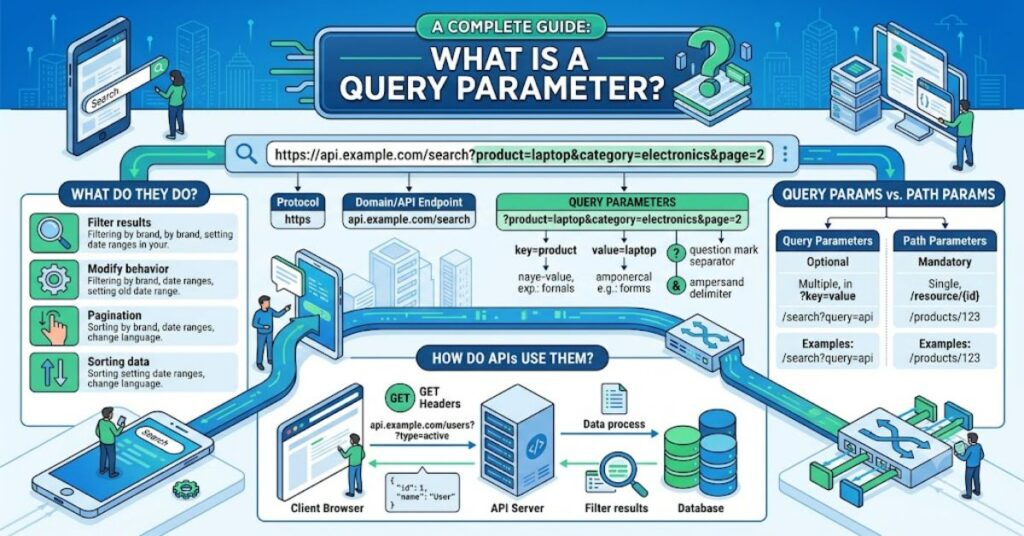
If you’ve ever noticed a question mark (?) followed by words and symbols in a web address, you’ve seen query parameters in action. Understanding what is a query parameter is essential for web developers, API users, marketers, and even website owners because these small pieces of a URL control how information is requested and displayed.
A query parameter is a key-value pair appended to the end of a URL. Instead of changing the core webpage or API endpoint, it passes additional instructions to the server. These instructions may tell the server to search for a keyword, filter products by category, sort results by price, or display a specific page of content.
For example:
Here, the server receives two parameters—category=laptops and sort=price—while the main endpoint remains /products.
Query parameters have become a standard feature of modern web applications and RESTful APIs. From Google searches to online shopping filters and weather applications, they quietly power many of the personalized experiences users interact with every day.
What Is a Query Parameter?
A query parameter is additional information attached to a URL after a question mark (?). Each parameter consists of:
- A key
- An equals sign (=)
- A value
Multiple parameters are separated using an ampersand (&).
Example:
In this example:
| Parameter | Value |
| q | python |
| page | 2 |
The webpage remains the same, but the server knows exactly which search term and results page the user wants.
How Query Parameters Work
When a browser sends a request, the server processes the URL and reads any query parameters attached to it.
The typical workflow is:
- User enters a URL.
- Browser sends the request.
- Server reads the endpoint.
- Server processes query parameters.
- Customized content is returned.
Because the endpoint itself does not change, developers avoid creating multiple URLs for every possible variation of a request.
Common Uses of Query Parameters
Query parameters are widely used across websites and APIs.
| Use Case | Example |
| Search | ?q=laptop |
| Filtering | ?brand=apple |
| Sorting | ?sort=price |
| Pagination | ?page=3 |
| Language selection | ?lang=en |
| Tracking campaigns | ?utm_source=email |
These parameters allow applications to respond dynamically without altering the underlying page structure.
Query Parameters in REST APIs
REST APIs frequently rely on query parameters because they provide flexibility without requiring multiple endpoints.
For example:
GET /users?department=marketing
Instead of creating separate endpoints for every department, developers simply pass the desired department as a parameter.
Additional examples include:
GET /products?category=phones
GET /orders?status=completed
GET /articles?author=John&page=2
This approach keeps APIs clean, scalable, and easier to maintain.
Benefits of Using Query Parameters
Query parameters provide several important advantages.
| Benefit | Why It Matters |
| Flexibility | One endpoint handles many requests. |
| Simplicity | URLs remain readable and organized. |
| Better user experience | Supports filtering and searching. |
| API efficiency | Reduces unnecessary endpoints. |
| Easy integration | Works across browsers and applications. |
These benefits explain why query parameters remain a standard part of modern web architecture.
Best Practices
Using query parameters effectively requires consistency and thoughtful design.

Recommended practices include:
- Use descriptive parameter names.
- Keep URLs readable.
- Encode special characters properly.
- Validate user input on the server.
- Avoid exposing sensitive information through URLs.
- Document API parameters clearly.
Following these guidelines improves both usability and security.
Common Mistakes
Although query parameters are simple, mistakes can lead to poor user experiences.
Common issues include:
- Using inconsistent naming conventions.
- Including confidential information such as passwords.
- Creating excessively long URLs.
- Ignoring URL encoding requirements.
- Forgetting server-side validation.
Developers should also avoid relying on parameter order unless explicitly required by the application.
Query Parameters vs Path Parameters
Many beginners confuse query parameters with path parameters.
| Feature | Query Parameter | Path Parameter |
| Location | After ? | Inside URL path |
| Purpose | Optional filtering and customization | Identify a specific resource |
| Example | /products?category=books | /products/125 |
| Flexibility | High | Moderate |
Path parameters identify resources, while query parameters modify how those resources are returned.
The Future of Query Parameters in 2027
Query parameters will remain fundamental to web development through 2027 despite advances in APIs and cloud-native architectures. GraphQL and modern API standards reduce some reliance on traditional filtering methods, yet REST APIs continue to dominate enterprise software and public web services.
As AI-powered applications become more common, developers will likely use query parameters alongside structured requests for personalization, analytics, localization, and performance optimization. Improved security practices and automated API documentation tools will also encourage more consistent parameter naming and validation across platforms.
Key Takeaways
- Query parameters send optional instructions to servers.
- They use key-value pairs appended after a question mark.
- REST APIs depend heavily on them for filtering and searching.
- Proper validation improves both security and reliability.
- Query parameters differ from path parameters in purpose.
- Clear naming conventions make APIs easier to maintain.
Conclusion
Understanding what is a query parameter is an essential step toward learning how websites and APIs communicate. Although they appear as simple additions to a URL, query parameters allow applications to deliver personalized search results, filter products, paginate large datasets, and support flexible API requests without changing the underlying endpoint.
For developers, they simplify API design and improve scalability. For users, they create smoother browsing experiences by enabling dynamic content without unnecessary complexity. When implemented using consistent naming, proper validation, and secure coding practices, query parameters remain one of the most effective tools in modern web development.
Frequently Asked Questions
What is a query parameter in a URL?
A query parameter is a key-value pair added after a question mark in a URL to send extra information to a web server.
Why are query parameters used?
They allow applications to search, filter, sort, paginate, and customize responses without changing the main endpoint.
Can a URL have multiple query parameters?
Yes. Multiple parameters are separated using the ampersand (&) character.
Are query parameters secure?
They should never contain sensitive information because URLs can be logged, cached, and shared.
What is the difference between query parameters and path parameters?
Path parameters identify a specific resource, while query parameters modify or filter the returned data.
Methodology
This article was prepared by reviewing official web standards, REST API documentation, developer references, and educational resources covering URL structure, HTTP requests, and API design. Technical concepts were cross-checked using authoritative documentation to ensure accuracy while presenting explanations in accessible language.
References
- Mozilla Developer Network. (2024). URL API.
- RFC 3986. (2005). Uniform Resource Identifier (URI): Generic Syntax. Internet Engineering Task Force.
- Microsoft Learn. (2024). Best practices for REST APIs.
- Google Developers. (2024). URL Structure and Web Fundamentals.
- OpenAPI Initiative. (2024). OpenAPI Specification.
AI Disclosure
This article was drafted with AI assistance and should be reviewed and verified by [Author Name] before publication. All technical references, examples, and citations should be independently validated by the editorial team at Matrics360.com.