
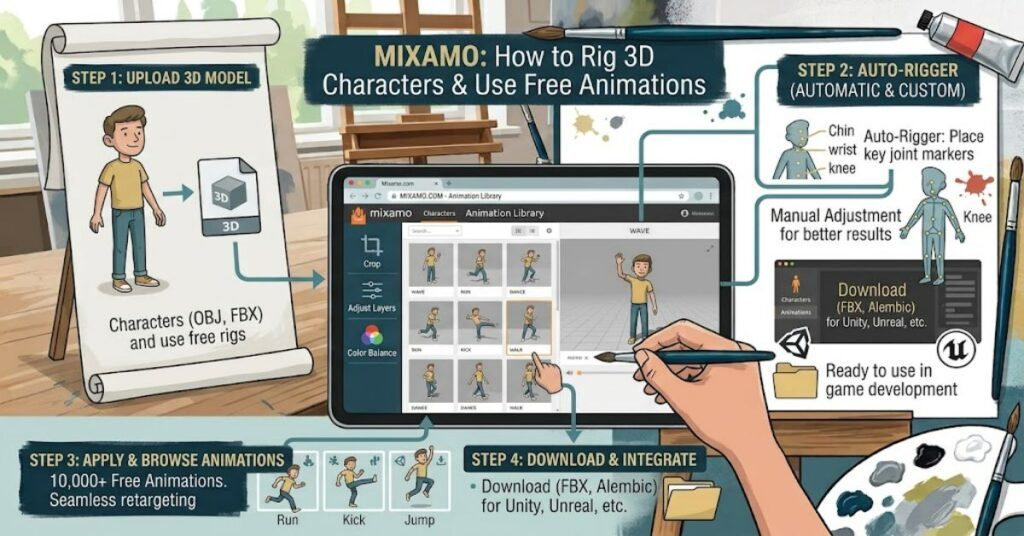
Mixamo is a browser-based 3D character animation service from Adobe that helps creators rig digital characters and apply ready-made movements without building every animation from scratch. Its library contains thousands of full-body animations captured from professional motion actors, including walking, running, jumping and fighting movements.
The service is useful for beginners, independent game developers, animators and educators who need moving characters but lack the time or experience to create complex skeletal rigs manually. Users can select a character, apply an animation, preview the result and download assets for use in supported creative workflows.
One of its main advantages is automatic character rigging. A rig is the underlying skeleton and control structure that allows a 3D model to move. Instead of manually creating a skeleton and assigning it to a mesh, users can upload a suitable humanoid model and follow Mixamo’s rigging process.
However, automatic does not mean universal. The system is designed for bipedal humanoid characters, and unusual proportions, detached body parts or large additional appendages can cause problems. Animations may also need adjustment after export to fit a project’s style and technical requirements.
Understanding these strengths and limitations helps creators decide when Mixamo is a practical shortcut and when a more specialised animation workflow is necessary.
What Is Mixamo and How Does It Work?
Mixamo combines two important parts of character animation: skeletal rigging and motion-based animation.
Rigging creates a skeleton that controls a character’s movement. Animation defines how that skeleton changes position over time. Mixamo connects these processes through a web interface, making character movement more accessible to people who do not specialise in technical animation.
Adobe’s official Mixamo service describes its library as a collection of motion-captured animations that can be applied to characters and previewed before export.
The typical workflow is straightforward:
- Sign in using an eligible Adobe ID.
- Choose a ready-made character or upload a compatible model.
- Use the automatic rigging process for an unrigged character.
- Select an animation and adjust available settings.
- Preview the movement and download the required files.
- Import the exported assets into a compatible 3D application or game engine.
This workflow reduces the need to build every movement manually. It does not remove the need for animation knowledge, however. Creators still need to check proportions, foot placement, transitions, scale and compatibility with their target software.
Main Features and Practical Uses
Automatic Character Rigging
Mixamo can generate a humanoid skeleton for a suitable uploaded character. During the process, users position markers around important joints, such as the elbows, wrists, knees and pelvis.
The quality of the result depends partly on the model. A clean mesh in a neutral pose is generally a better starting point than a highly distorted character with separated limbs or complicated extra geometry.
Motion-Captured Animation Library
The animation collection includes movements for common activities, from walking and running to more specialised actions. Users can preview movements and apply them to supported characters.
Motion capture provides a starting point based on human movement, but the result is not automatically perfect for every scene. A stylised character, for example, may require different timing or exaggerated motion to match its design.
Export and Integration
Creators can download character and animation files for use in other applications. Adobe’s documentation describes supported upload formats including FBX, OBJ and ZIP, with FBX used for uploading an already-rigged character.
Export settings matter. A file intended for a real-time game may need different settings from one used for a high-quality film render.
Mixamo Compared with Other Animation Approaches
| Approach | Main advantage | Main limitation | Best use |
| Mixamo | Fast access to humanoid rigs and animations | Limited control over the underlying motion | Prototypes and common movements |
| Manual rigging | Detailed control over skeleton design | Requires technical skill and time | Custom characters and complex rigs |
| Hand-keyed animation | Precise artistic control | Can be time-consuming | Stylised performances and hero shots |
| Full motion-capture pipeline | Can capture specialised performances | Often requires extra equipment, processing and cleanup | High-control production work |
These approaches are not mutually exclusive. A production team might use Mixamo for background characters, manual animation for a main character and motion capture for a specialised sequence.
Benefits, Limitations and Key Considerations
Mixamo can lower the entry barrier for character animation, especially when a project needs standard human movements. It can help a small team build a prototype before investing in custom animation.
There are three important practical considerations.
First, model preparation affects the result. Adobe advises that characters should have recognisable humanoid body parts, a neutral pose and a clean mesh. Extra objects, disconnected parts and unusual proportions can interfere with rigging.

Second, an animation that previews correctly may still need cleanup. Foot sliding, awkward contact with objects, incorrect scale and sudden transitions can become more obvious in a finished scene. A preview should be treated as a quality check, not proof that an asset is production-ready.
Third, licensing and distribution are different questions. Adobe’s Mixamo FAQ states that its characters and animations may be used in personal, commercial and non-profit projects. However, creators should distinguish using an asset within a finished project from redistributing the original character or animation files as standalone assets. Check the current terms before publishing or selling a product.
Quick Planning Table for a Mixamo Project
| Project requirement | What to check | Why it matters |
| Character model | Humanoid shape and clean geometry | Improves rigging compatibility |
| Animation choice | Movement fits the scene and character | Avoids mismatched performance |
| Export format | Target application’s import requirements | Prevents file compatibility issues |
| Performance | Polygon count, skeleton and animation complexity | Supports efficient playback |
| Licensing | Current usage and redistribution terms | Reduces legal and publishing risks |
The Future of Mixamo in 2027
By 2027, accessible character-animation tools are likely to remain useful in game prototyping, education and independent production. However, the future direction of Mixamo’s features, support and service availability should not be assumed without an official announcement.
The broader industry continues to combine motion capture, procedural animation and AI-assisted production. These techniques may help creators build more varied performances, but they also introduce questions about control, consistency and the quality of generated movement.
For practical planning, creators should maintain local copies of downloaded assets, document their export settings and avoid making a project dependent on a single online service. Adobe’s existing documentation recommends saving rigged characters locally because the service does not maintain a full history of every previously used character.
The most reliable strategy is to treat online animation tools as part of a wider production pipeline rather than the sole location for important project files.
Key Insights
- Automatic rigging saves setup work but depends on character design and mesh quality.
- Motion-captured animation offers a strong starting point, not a substitute for final quality control.
- Export settings should be selected for the target application and use case.
- Keeping local asset backups reduces disruption if an online workflow changes.
- Commercial use and redistribution of original assets are separate licensing considerations.
- A hybrid workflow can balance speed, artistic control and technical reliability.
Conclusion
Mixamo makes 3D character animation more accessible by combining automatic rigging with a large library of ready-made movements. It can be particularly useful for beginners, independent developers, educators and production teams that need standard humanoid animation without building every component from the beginning.
Its main strength is speed. Yet a successful workflow still depends on suitable character geometry, careful animation selection, correct export settings and review inside the target application. Unusual creatures, highly stylised performances and complex character interactions may require specialist tools or manual work.
Creators should also review Adobe’s current licensing terms before distributing projects or assets commercially. Using an animation inside a finished game or film is not the same as selling the original files separately.
Used with realistic expectations, Mixamo can serve as an efficient part of a broader 3D pipeline. It is most effective when it reduces repetitive setup work while leaving artists in control of quality, performance and the final creative result.
Frequently Asked Questions
1. What is Mixamo used for?
Mixamo is used to rig suitable 3D humanoid characters and apply ready-made animations. Common uses include games, films, illustrations, prototypes and educational projects.
2. Is Mixamo free to use?
Adobe’s published FAQ states that Mixamo is available without an additional subscription for users with an eligible Adobe ID. Check the current access requirements and terms before starting a commercial project.
3. Can Mixamo animate any 3D model?
No. Its automatic rigging and animation library are designed for bipedal humanoid characters. Animals, vehicles, highly distorted models and characters with unusual appendages may not work as expected.
4. Can Mixamo animations be used in commercial games?
Adobe’s FAQ permits use of its characters and animations in commercial projects. Review the current licence terms carefully, particularly restrictions on redistributing the original assets as standalone files.
5. Which file formats does Mixamo support?
Adobe’s documentation identifies FBX, OBJ and ZIP among supported character upload formats. Already-rigged characters must be uploaded as FBX according to its published instructions. Check the current documentation for requirements relevant to your workflow.
6. Why might automatic rigging fail?
Common causes include poor mesh quality, a non-neutral pose, disconnected body parts, extra objects in the scene or proportions that differ greatly from a typical humanoid character.
References
Adobe. (n.d.). Mixamo: Common questions. Adobe Help Centre.
Adobe. (n.d.). Upload and rig 3D characters with Mixamo. Adobe Help Centre.
Adobe. (n.d.). Mixamo. Official service overview.
Methodology
This article was prepared using Adobe’s official Mixamo service description, help documentation and published FAQ. It explains the documented workflow and common compatibility considerations without claiming independent hands-on testing, measured performance results or personal experience.
Feature availability and licensing terms can change. The article does not independently test every export format or third-party application, and the comparison table is qualitative rather than a controlled benchmark. Before publication, a human editor should confirm the latest Adobe documentation, review the applicable terms and verify any claims that depend on current service behaviour.
Editorial disclosure: This article was drafted with AI assistance and should be reviewed and verified by a human editor before publication.