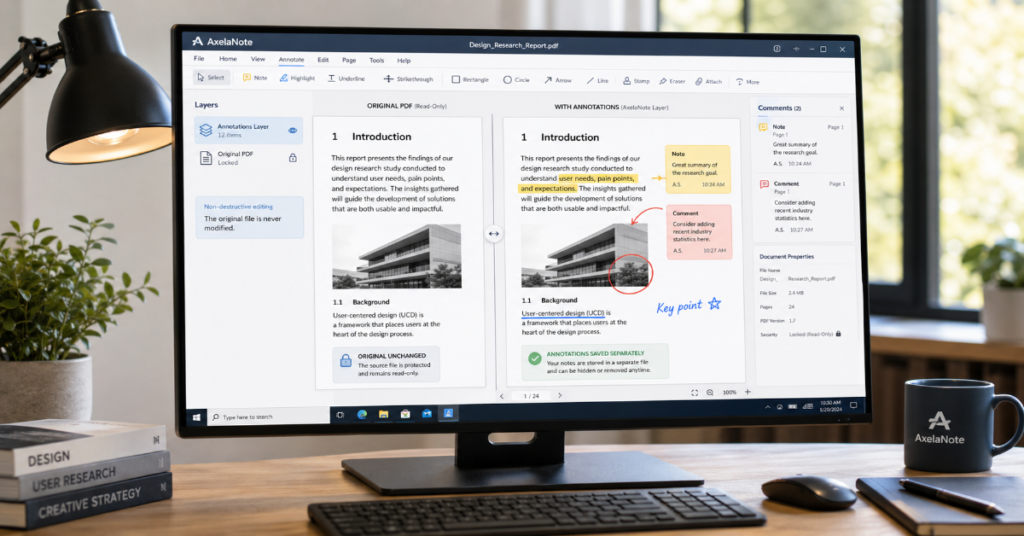
Axelanote is a Windows PDF and image annotation tool designed for one specific problem: how to write on a document without changing the original file. Instead of embedding comments directly into the PDF structure, Axelanote places a transparent annotation layer over the source document. That makes it useful for technical drawings, school marking, proofing, public-sector paperwork and restricted PDFs where ordinary annotation tools may be blocked. TransRecog describes the product as software that lets users write on PDFs and images by placing a “transparent sheet” over the original, including PDFs where annotation or printing is restricted.
That distinction matters. Most PDF tools treat annotation as part of the file. Axelanote treats annotation as a parallel layer. For teams that need to preserve evidence, avoid overwriting source records or reuse notes after a document replacement, that architecture changes the workflow.
The tool is also firmly Windows-centered. TransRecog lists Windows 10 64-bit and Windows 11 as supported operating systems, with .NET Framework 4.5 or later and a Visual C++ redistributable required. The same product page lists keyboard, mouse and screen input, while IPROS states that the software supports keyboard, mouse, pen and touch input, making it relevant for Surface-style tablet PCs.
For Matrics360 readers who follow document security and workflow tools, this sits close to broader productivity and information-control topics, including exposed file risks in indexed logs and structured knowledge-management systems already covered on the site.
What Axelanote Actually Does
Axelanote is not trying to replace every feature in Adobe Acrobat, PDF-XChange Editor or PDF Annotator. Its core system is simpler and more specialized: open a PDF or image, place an editable overlay above it, then write, draw or mark up the visible document while the source remains intact.
TransRecog’s official feature page says the product can write on PDF originals by overlaying a transparent sheet and can handle PDFs where annotation or printing is prohibited. It also highlights handwritten use, page replacement, page insertion, page deletion, rotation and PDF comparison features.
That creates three practical use cases:
- Proofing technical drawings without modifying the issued drawing.
- Marking exams, reports or forms while retaining the original submission.
- Reviewing restricted PDF files where normal comment tools are unavailable.
The hidden advantage is audit discipline. In regulated or contract-heavy environments, the separation between “original document” and “review layer” can reduce confusion about what was changed, what was only commented on and which file is the authoritative source.
System Analysis: Why the Overlay Model Matters
Most PDF annotators write comments, highlights or ink objects into the PDF file itself. That works well for collaboration because another reader can open the same file and see the markups. The trade-off is that the file now carries review data inside it.
Axelanote works differently. Its transparent-layer model protects the source from direct alteration. This is especially useful when the PDF is a drawing, certificate, tender document, official form or locked reference document.
Structured insight table:
| Workflow need | Standard PDF annotation | Axelanote overlay model | Practical implication |
| Preserve original file | Possible, but users must manage copies | Built into workflow logic | Lower risk of overwriting source files |
| Mark restricted PDFs | Often blocked by document permissions | Designed to support restricted PDFs | Useful for review-only documents |
| Pen markup | Depends on app and device | Built for handwritten review | Strong fit for tablet PCs |
| Share annotations | Usually embedded in PDF | May require Axelanote workflow handling | Check export and recipient requirements |
| Compliance clarity | Can be mixed with source file | Separates source and markup | Easier document provenance |
The most important practical point is also the easiest to miss: non destructive annotation helps only if the team has a clear storage and export process. Without naming conventions, version control and review ownership, overlay files can become another layer of confusion.
Pricing, Licensing and Trial Access
TransRecog states that Axelanote can be used free for 14 days after installation. For continued personal use, the official page lists a monthly plan at 429 yen per month including tax and an annual plan at 4,290 yen per year including tax. The page also says corporate customers can purchase through distributors, with a different pricing structure.
Pricing table:
| Option | Listed details | Best suited for | Watch point |
| 14-day trial | Free after installation | Testing workflow fit | Too short for full team rollout testing |
| Monthly plan | 429 yen per month including tax | Individual short-term use | Higher annual cost than yearly plan |
| Annual plan | 4,290 yen per year including tax | Regular individual use | Best value if the tool becomes routine |
| Corporate purchasing | Through distributors | Teams, agencies, institutions | Pricing differs from individual plans |
The product page also states that an internet connection is required for license verification, while an offline-compatible version is available by inquiry. That detail matters for public-sector, construction, factory-floor or defense-adjacent workflows where devices may operate in restricted network environments.
Axelanote vs Popular PDF Annotation Tools
The fair comparison is not “which PDF app has the most features?” It is “which tool fits the review problem?”
| Tool | Core strength | Platform fit | Annotation model | Best use case |
| Axelanote | Non destructive overlay markup | Windows 10 and 11 | Transparent layer over PDF or image | Locked PDFs, drawings, exams, source-preserving review |
| PDF Annotator | Full Windows PDF markup suite | Windows | Saves annotations in PDF, removable later | General business PDF markup |
| PDF-XChange Editor | Broad PDF editing and annotation tools | Windows | Standard PDF editing and comments | Power users needing many PDF tools |
| Drawboard PDF | Pen-friendly PDF review | Windows and cross-device workflows | Direct PDF markup | Stylus-heavy reading and collaboration |
| Adobe Acrobat Reader | Widely compatible PDF viewing and commenting | Broad platform support | Standard PDF comments | Mainstream commenting and sharing |
PDF Annotator’s official page emphasizes adding comments, corrections, signatures, highlights, photos, drawings and handwritten annotations on Tablet PCs, while its download page lists Version 10 for Windows. Its price list shows PDF Annotator 10 at 79.95 USD for smaller-volume purchases.
The difference is strategic. PDF Annotator and similar tools are stronger when the marked-up PDF must travel to many recipients who do not use the same software. Axelanote is stronger when the original file must remain untouched or when ordinary PDF restrictions interfere with review.
Pen Input on Surface and Tablet PCs
Axelanote’s strongest hardware fit is a Windows tablet or convertible laptop. IPROS states that the product is compatible with pen and touch input and is suitable for tablet PCs such as Surface devices.
In practice, that means the tool makes the most sense for people who would otherwise print a PDF, mark it by hand, scan it and send it back. Construction review, classroom grading, field inspection and paperless meeting notes are natural fits.
But pen input is only part of the experience. Users should also test palm rejection, page navigation, zoom performance and file size behavior before adopting the tool for large drawing sets. TransRecog lists constraints including PDF paper size up to 1 square meter, a maximum of 2,500 A4 pages in the current version and up to 4,000 writable objects per page.
Real-World Impact and Document Workflows
TransRecog lists multiple customer examples, including Tokyo Shigoto Foundation, Nissan Motor, Daiwa Lease, Daito City, Takano Town and other organizations. The described use cases include telework support, training material annotation, drawing review, cost reduction and equipment inspection.
These examples show where the product’s value is most credible:
- Organizations with large volumes of paperwork.
- Teams that still rely on handwriting as part of review.
- Departments where source documents must not be altered.
- Workflows where printing, scanning and manual document routing create avoidable cost.
For a publication like Matrics360, this also connects to a wider shift in digital workflow consolidation. Tools that reduce context switching have become more visible across productivity software, including all-in-one platforms such as Oncepik and knowledge base systems designed to organize internal processes.
Risks and Trade-Offs
Axelanote’s biggest strength is also its biggest adoption question. If annotations live outside the original PDF, teams need to understand how those notes are saved, exported, archived and shared. A reviewer working alone may love the separation. A multi-company project team may need a stricter handoff process.
The second issue is availability. TransRecog’s official page lists a limitation that the product is available only in Japan. That should be verified before international purchasing or deployment planning.
The third issue is compatibility. Locked PDFs can be annotated through the overlay model, but that does not mean the locked source file is permanently edited. For legal, academic or business users, this distinction is important. Axelanote helps users add notes over restricted documents, but it should not be framed as a tool for permanently bypassing document protections.
Original insights for editors:
- The overlay model is strongest where document provenance matters more than universal PDF portability.
- Offline license needs may become a purchasing blocker in secure environments unless handled during procurement.
- The object-per-page and page-count limits should be tested against real construction drawings, not just sample PDFs.
The Future of Axelanote in 2027
By 2027, tools like Axelanote will likely be shaped by three pressures: paperless administration, stylus-based Windows devices and document governance.
The demand side is clear. TransRecog’s customer examples already show public-sector, construction, training and inspection use cases. The product’s May 2026 update history also indicates continued maintenance, with TransRecog listing Axelanote Ver. 1.152 Build 1152 among recent posts.
The technical direction is less certain. The next competitive step for overlay annotation tools may involve better export controls, richer collaboration, easier cloud storage integration and clearer compliance logging. But those features also introduce risks. Cloud sync can weaken local file control. Shared annotation layers can create permission problems. AI summarization of annotations may raise confidentiality concerns.
The realistic 2027 outlook is not explosive global disruption. It is narrower: Axelanote may continue to be valuable in Japanese Windows-heavy organizations where paperless review, locked PDF handling and handwritten markup remain everyday problems.
Takeaways
- Axelanote is a specialist document-review tool, not a broad PDF editor.
- Its transparent-layer approach is genuinely useful when original files must stay untouched.
- Surface and tablet users are likely to get more value from the product than mouse-only users.
- The pricing is straightforward for individuals, but corporate buyers need distributor guidance.
- Locked PDF annotation should be treated as review-layer markup, not permanent source-file editing.
- Teams should test export, archiving and sharing before adopting it at scale.
- The most credible use cases are drawings, proofing, grading, field inspection and paperless administration.
Conclusion
Axelanote solves a narrow but important PDF problem: it lets Windows users write over documents without altering the source. That makes it more than another annotation app. Its value sits in document preservation, review discipline and pen-friendly workflows where paper still feels easier than software.
The trade-offs are real. It is Windows-focused, regionally limited according to the official product page and less universally portable than standard embedded PDF comments. Teams also need clear rules for saving, exporting and sharing annotation layers.
Still, for the right user, the tool’s logic is strong. If the original document matters, if locked PDFs create review friction or if handwritten markup remains part of the workflow, Axelanote deserves serious evaluation. It is not the most general PDF tool. It is a focused answer to a document-control problem many general tools handle poorly.
FAQ
What is Axelanote used for?
Axelanote is used to annotate PDFs and image files on Windows without directly changing the original file. It is especially useful for drawings, proofs, forms, exams and restricted PDFs where preserving the source document matters.
Can Axelanote edit locked PDF files permanently?
No. The better way to describe it is that Axelanote lets users add an editable overlay above restricted PDFs. That supports review and note-taking, but it should not be described as permanently editing the protected source PDF.
Does Axelanote work on Windows 11?
Yes. TransRecog lists Windows 10 64-bit and Windows 11 in the required operating environment. The product also requires .NET Framework 4.5 or later and a Visual C++ redistributable.
Is Axelanote good for Surface tablets?
Yes, it appears well matched to Surface-style workflows. IPROS says Axelanote supports pen and touch input and is suitable for tablet PCs such as Surface devices.
How much does Axelanote cost?
The official TransRecog page lists a 14-day free trial, then 429 yen per month or 4,290 yen per year including tax for individual purchase. Corporate pricing differs and is handled through distributors.
How is Axelanote different from PDF Annotator?
PDF Annotator is a broader Windows PDF markup tool that saves annotations into the PDF. Axelanote focuses on overlay annotation so the original file stays unchanged. The better choice depends on whether source preservation or universal sharing is more important.
Methodology
This article was prepared from the uploaded Matrics360 production prompt, official TransRecog product documentation, TransRecog download and pricing details, IPROS product information, Tekwind distributor information and comparison checks against PDF Annotator materials.
No hands-on benchmark was conducted for this draft. Claims about pen input, pricing, operating environment, trial duration, page limits and customer use cases are attributed to available public sources. A human editor should verify all purchase-region restrictions, licensing terms, APA references and internal links before publication.
Suggested disclosure: This article was drafted with AI assistance and reviewed and verified by Awais Khalid. All data, citations and claims should be independently confirmed by the editorial team at Matrics360.com before publication.
References
TransRecog. (2025). Axelanote product features, pricing and operating environment. TransRecog.
TransRecog. (2018). Axelanote download page. TransRecog.
IPROS. (2023). Drawing PDF editing tool “Axelanote” TransRecog. IPROS GMS.
Tekwind. (2025). AXELANOTE device and support service. Tekwind.
PDF Annotator. (2026). PDF Annotator for Windows product and pricing information. GRAHL Software Design.